Android – JSON Parsing example

Problem: How to parse JSON response? 
Solution:

Many times we get JSON string as a response from web server, now we have to parse the JSON string into either array, objects or values to display the response in the particular views like ListView, TextView, etc.

We can use JSONObject and JSONArray for parsing the response string.

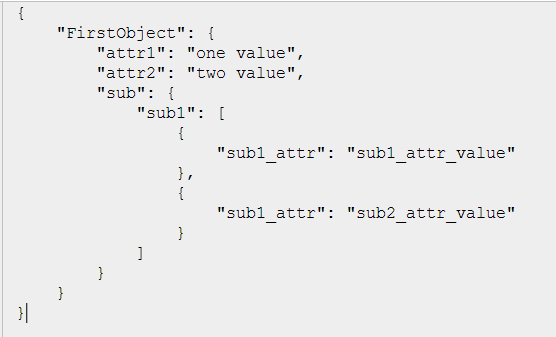
Now, consider this sample JSON response string for the understanding of parsing example:

{"FirstObject": { "attr1":"one value" ,"attr2":"two value",

   "sub": { "sub1":[ {"sub1_attr":"sub1_attr_value" },{"sub1_attr":"sub2_attr_value" }]}
  }
}

And to validate JSON String, i would suggest you JSONLint.com

TechnoTalkative - JSON parsing example
Now, let me start to give step by step demo for parsing the same JSON resoponse:

Step – 1:
create a JSONObject with the received response string:

JSONObject jsonObject = new JSONObject(strJSONResponse);

Step – 2:

Get the main object from the created json object by using getJSONObject() method:

JSONObject object = jsonObject.getJSONObject("FirstObject");

Step – 3:
Now this FirstObject contains 2 strings namely “attr1″,”attr2″ and a object namely “sub”.
So get 2 strings by using getString() method.

String attr1 = object.getString("attr1");
String attr2 = object.getString("attr2");

and get a sub object by using the same getJSONObject() method as we have used above:

JSONObject subObject = object.getJSONObject("sub");

Step – 4:

Now this “sub” sub-object contains 1 array namely “sub1″. So we can get this JSON array by using
getJSONArray() method:

JSONArray subArray = subObject.getJSONArray("sub1");

Now, we just need to process this array same as simple string array:

for(int i=0; i<subArray.length(); i++)
{
     strParsedValue+="\n"+subArray.getJSONObject(i).getString("sub1_attr").toString();
}

This is complete now. Enjoy :) :)

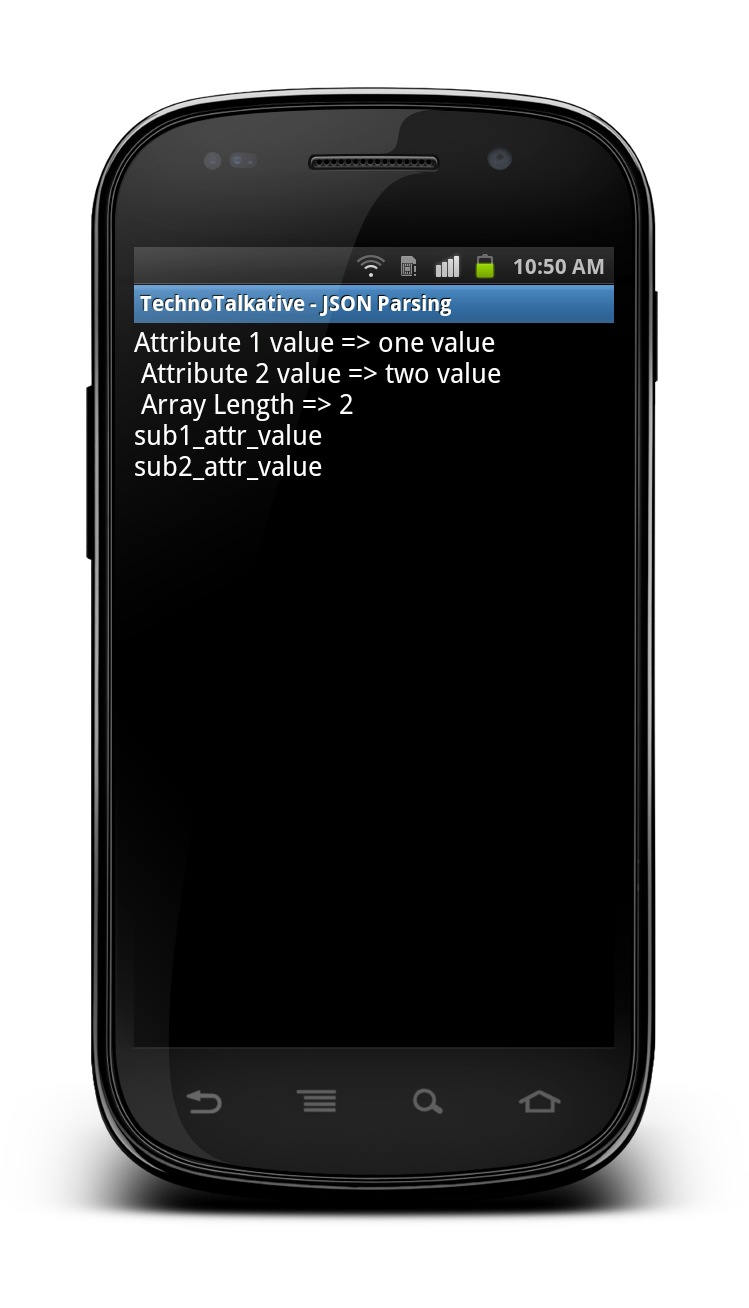
Output Snapshot:

TechnoTalkative - JSON Parsing example

Full source code:

package com.technotalkative.jsonparsing;

import org.json.JSONArray;
import org.json.JSONException;
import org.json.JSONObject;

import android.app.Activity;
import android.os.Bundle;
import android.widget.TextView;

public class JSONParsingActivity extends Activity {
    /** Called when the activity is first created. */

	TextView txtViewParsedValue;
	private JSONObject jsonObject;

	String strParsedValue = null;

	private String strJSONValue = "{\"FirstObject\":{\"attr1\":\"one value\" ,\"attr2\":\"two value\","
			+"\"sub\": { \"sub1\":[ {\"sub1_attr\":\"sub1_attr_value\" },{\"sub1_attr\":\"sub2_attr_value\" }]}}}";

	@Override
    public void onCreate(Bundle savedInstanceState) {
        super.onCreate(savedInstanceState);
        setContentView(R.layout.main);

        txtViewParsedValue = (TextView) findViewById(R.id.textView1);

        try {
			parseJSON();

		} catch (JSONException e) {
			// TODO Auto-generated catch block
			e.printStackTrace();
		}
    }

    public void parseJSON() throws JSONException
    {
    	jsonObject = new JSONObject(strJSONValue);

    	JSONObject object = jsonObject.getJSONObject("FirstObject");
    	String attr1 = object.getString("attr1");
    	String attr2 = object.getString("attr2");

    	strParsedValue="Attribute 1 value => "+attr1;
    	strParsedValue+="\n Attribute 2 value => "+attr2;

    	JSONObject subObject = object.getJSONObject("sub");
    	JSONArray subArray = subObject.getJSONArray("sub1");

    	strParsedValue+="\n Array Length => "+subArray.length();

    	for(int i=0; i<subArray.length(); i++)
    	{
    		strParsedValue+="\n"+subArray.getJSONObject(i).getString("sub1_attr").toString();
    	}

    	txtViewParsedValue.setText(strParsedValue);
    }
}

// Actual JSON Value
/*
{
    "FirstObject": {
        "attr1": "one value",
        "attr2": "two value",
        "sub": {
            "sub1": [
                {
                    "sub1_attr": "sub1_attr_value"
                },
                {
                    "sub1_attr": "sub2_attr_value"
                }
            ]
        }
    }
} */

// Same JSON value in XML
/*
<FirstObject obj1="Object 1 value" obj2="Object 2 value">
	<sub>
	    <sub1 sub1_attr="sub1_attr_value" />
	    <sub1 sub1_attr="sub2_attr_value" />
	</sub>
</FirstObject> */

Download this example: https://github.com/PareshMayani/Android-JSON-Parsing

About Paresh Mayani

I'm Paresh Mayani, a passionate mobile application developer from India. Having been involved in android app development since 2010. By passion, I am Head/Organizer of Google Developers Group (GDG), Ahmedabad
  • kunal

    it’s turn out to be very useful post for me
    thnx..

    • http://pareshnmayani.wordpress.com Paresh N Mayani

      Thanx for your feedback and i am happy that this post could be helpful to persons including you :)

      • kunal

        Hey please post about accessing RESTful web service in Android or any Sample App that focuses on accessing any named web service in android application.

        waiting for your post.. :D

  • http://www.facebook.com/miteshpatel293 Mitesh Patel

    hii paresh,
    i start my carrear now i complete my MCA . i am selected in one company based on Android or iphone at Ahmedabad.but i does’t have a knowledge of Android . but i have a good knowledge of

  • http://www.facebook.com/miteshpatel293 Mitesh Patel

    j2ee and whole java can i learn the Android easily from basic at own…
    plz reply

    • http://pareshnmayani.wordpress.com Paresh N Mayani

      Hi Mitesh,

      I suggest you to go through these StackOverflow questions:
      1. http://goo.gl/hMLAE
      2. http://goo.gl/Iyg5h

      From both these links, you get all the resources. I hope this helps you.
      All the best for Android Programming.
      Enjoy :)

  • khawar raza

    Very nice and simple tutorial…

  • http://twitter.com/jibmaster jibmaster (@jibmaster)

    Very useful post. The way you broke down steps 1-4 was exactly what I needed. Thank you!

    • http://pareshnmayani.wordpress.com Paresh N Mayani

      Thanx for the feedback. Keep enjoying other article also :)

  • Arun

    Thats really very simple and useful.. very few of the clear tutorials I have seen..

    • http://pareshnmayani.wordpress.com Paresh N Mayani

      Thanx Arun for your feedback :)

  • http://yogeshkumar.wordpress.com Yogesh
    • http://pareshnmayani.wordpress.com Paresh N Mayani

      Thanx Yogesh,
      Yes this library is also useful and used by many but If everything is in-built then why should we use 3rd party API/library?

  • Basanta

    ya definitely it is help ful for me.thanks Paresh….

  • http://www.madhavpalshikar.com Madhav Palshikar

    Thanks alot… gr8 post.

  • http://www.esophagealspasms.net esophageal spasm

    Wow this is a must visit, bookmarking your blog now. Please continue to write, your style is very well read.

  • http://widhiecyber.wordpress.com widhiecyber

    very great tutorial
    making the complicated json be seen more easily

    thanks a lot :)

    • http://www.technotalkative.com/ Paresh N. Mayani

      Thanx and welcome anytime dear :)

  • renato

    Hey, nice post.
    1 – But how i get the string returned from a Web Service?(httos, something like that?)
    2 – and then assign it to my JSON object?
    3 – and later parse my JSON OBJECT into my MyClass Objects?

    did u get it?

    • http://www.technotalkative.com/ Paresh N. Mayani

      Yes i got your doubt exactly.

      1 – But how i get the string returned from a Web Service?(httos, something like that?)
      => For this first implement the webservice call: , in response you will get InputStream, to convert it into string implement this function InputStream to String Conversion.

      2 – and then assign it to my JSON object?
      => Now start the tutorials of JSON Parsing from step-1: JSONObject jsonObject = new JSONObject(strJSONResponse);

      3 – and later parse my JSON OBJECT into my MyClass Objects?

      Now, i would request you to implement AsyncTask, do your above steps inside the doInBackground() and implement display kind of operation in onPostExecute() method of AsyncTask.

  • Ani

    Hi,

    Thanks for a great tutorial. But how do you see the strings in JSON? I’m just starting to work on parsing the string returned by YelpService, and I’d like to know if there is a way to see what the string looks like rather than parsing it blindly… I’ve tried to create a test that will just print out the string on the console, but for some reason this does not work.

    Also, Could you explain why we extend the parser class to Activity?

    • http://www.technotalkative.com/ Paresh N. Mayani

      Instead of implementing code to print JSON string on console, you can simply validate your JSON string at here: http://jsonlint.com/

      • Ani

        Thanks,

        You didn’t answer my last question. Could you explain why you’re extending to Activity class?

        • http://www.technotalkative.com/ Paresh N. Mayani

          FYI, i didn’t extended anything other than Activity to JSONParsingActivity class. Check the code.

  • khawar

    really helpfull thnx

    • pareshmayani

      Welcome !! And thanx for the feedback.

  • http://www.facebook.com/shwettank Shwettank Ramteke

    How to fetch data from Mysql database in GridView in Android, do you have any idea regarding this, please do let me know. Thanks in advace.
    With Regards from,
    Shwettank Ramteke

  • David Compton

    Very helpful – thankyou

  • Shaech Shah

    wonderful… such complete sources are easy to find and it gr8ly helps novices like me.

  • FrustratedMonkey

    how about the other way around? retrieve data from the sqlite database and send that retrieved data to the server using JSON. can you help me with this?

    • http://www.technotalkative.com/ Paresh Mayani

      Yes sure, but let me know: 1) Are you able to prepare request structure in JSON format? 2) Have you tried to make request using HTTP GET/POST? There are many questions……..

      • FrustratedMonkey

        for the mean time let’s leave behind connecting to the server yet (HTTP GET?POST request part), what i need is to get the data from the SQLITE and convert it to JSON. My code uses arraylist hashmap in retrieving the data.

        DataList = controller.getAllData();

        for (HashMap map : DataList)

        for(Entry mapEntry : map.entrySet()){

        String key = mapEntry.getKey();

        Object value = mapEntry.getValue();

        System.out.println(key+” “+value);

        //Data.put(key,value);

        }What makes it difficult for me is converting each value to json.

  • FrustratedMonkey

    hi may i have your email. i have some codes i want you to see and might be able to help me solve it. please.

    • http://www.technotalkative.com/ Paresh Mayani

      If you have doubts/code regarding JSON Parsing example then post it on code sharing site and paste links here. Otherwise you can always contact me.

  • abdul

    am new to android tell me how to about jason and how to implement it