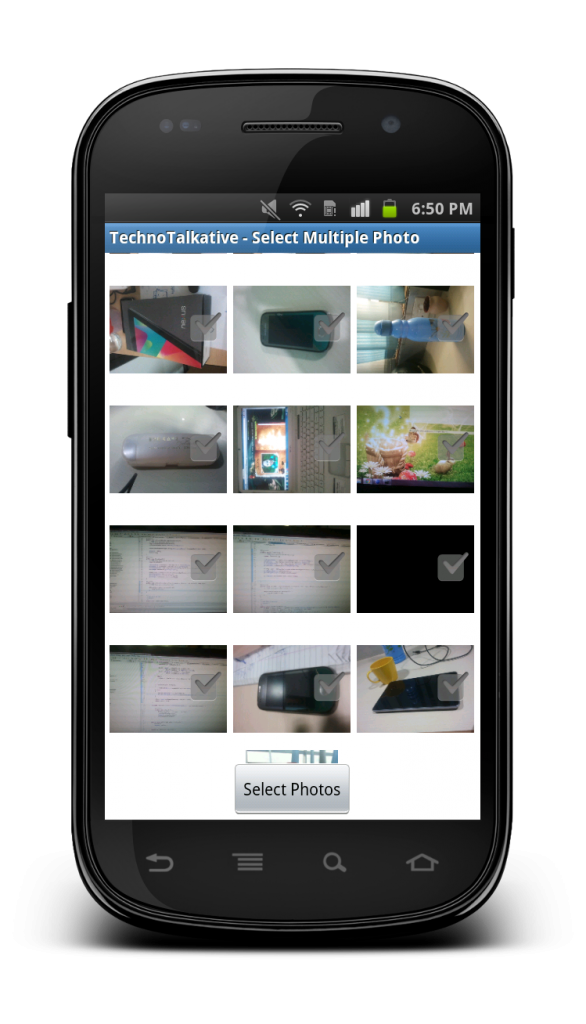

Today I am going to discuss about implementation of selecting multiple photos from Gallery. You know, I personally have searched enough to find out a solution which allows me to select multiple images from android’s native gallery, I have tried different solutions to achieve the same.
Select multiple photos from Gallery
There are 2 ways to implement multi-selection of images in gallery:
- Intent for getting multiple images
- Define custom gallery with fetching and loading photos from native gallery.
1. Intent for getting multiple images
As being a native lover, I tried to implement a solution same as we select single image from gallery, by using below code:
Intent intent = new Intent();
intent.setType("image/*");
intent.setAction(Intent.ACTION_GET_CONTENT);
startActivityForResult(Intent.createChooser(intent, "Select Picture"), PICK_IMAGE);
I thought using the above solution, I would be able to select multiple images but I am unable to. After searching, I came to know we can use SEND_MULTIPLE intent but I haven’t found a way to implement this and select multiple images. I will do R&D onto it and try to implement it, will share if I will get any success.
2. Customized gallery
As we don’t know about how to implement the send multiple intent solution, we can go with customizing gallery solution, in which we will try to implement a solution by fetching photos and loading into GridView. One of my friend Vikas Kanani has already explored and shared about this solution. I tried to implement the same solution but I have found some issues in it after thorough testing:
- Images are loading very slow if we are having larger number of images, lets say 2000-5000
- Crashing if we load more images
For resolving above issues, what I did? I have implemented Asynchronous image loading so that every images get loaded asynchronously.
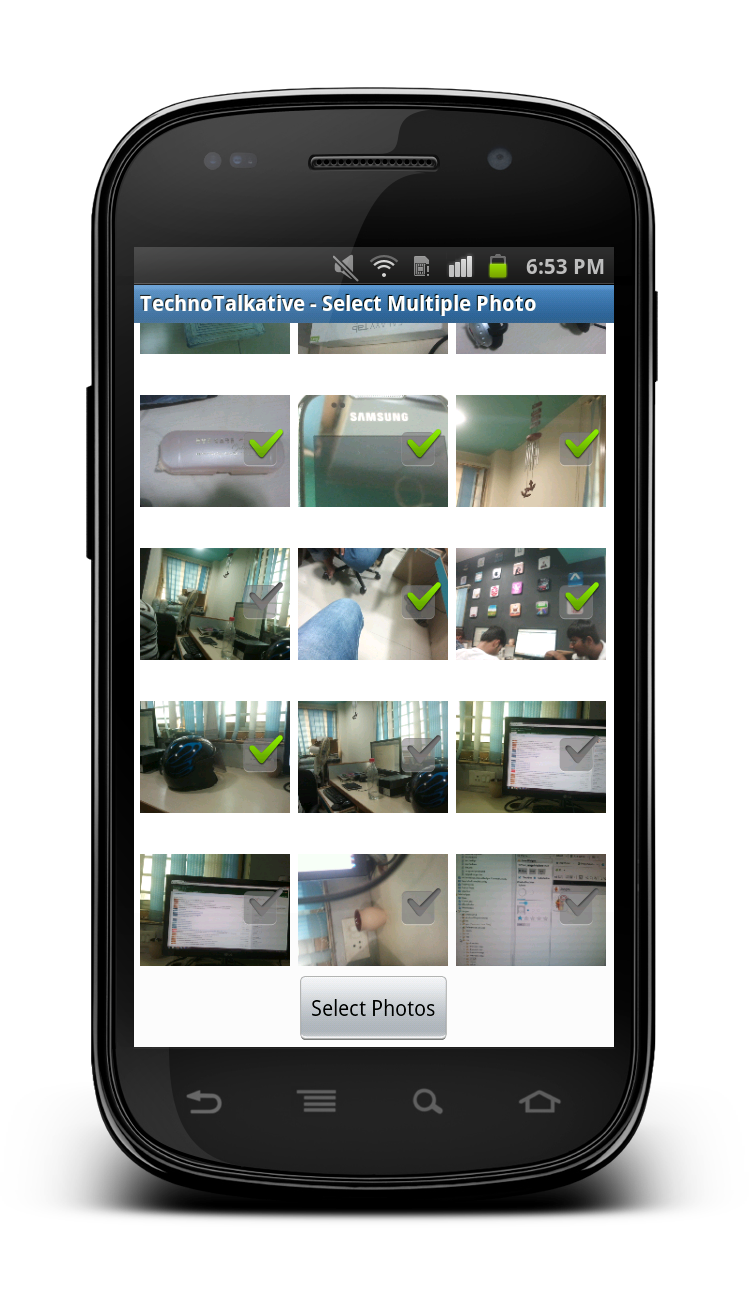
Now, let’s implement improved solution!
Step 1: Download Image loader library from Here.
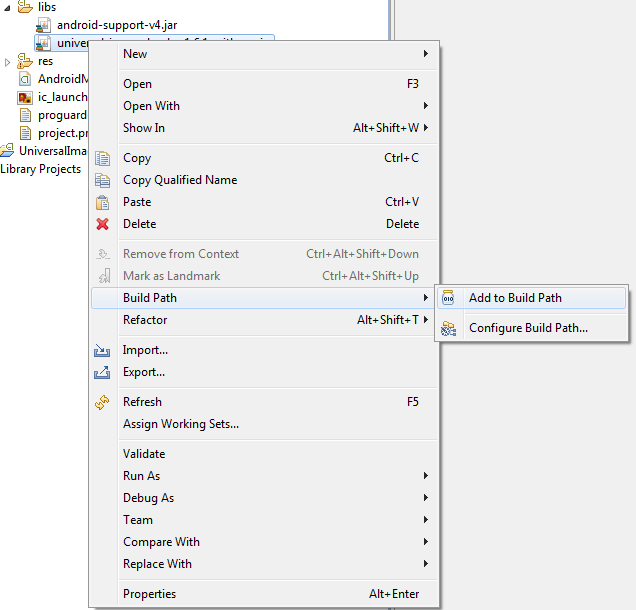
Step 2: Add the library inside the libs folder, right click on the jar file -> Select Add to Build Path
Step 3: Define row layout for image item
row_multiphoto_item.xml
<?xml version="1.0" encoding="utf-8"?>
<RelativeLayout xmlns:android="http://schemas.android.com/apk/res/android"
    android:layout_width="fill_parent"
    android:layout_height="fill_parent" >

    <ImageView
        android:id="@+id/imageView1"
        android:layout_width="100dp"
        android:layout_height="100dp"
        android:src="@drawable/ic_launcher" />

    <CheckBox
        android:id="@+id/checkBox1"
        android:layout_width="wrap_content"
        android:layout_height="wrap_content"
        android:layout_alignRight="@+id/imageView1"
        android:layout_centerVertical="true"/>

</RelativeLayout>
Step 4: Define activity layout with GridView
ac_image_grid.xml
<?xml version="1.0" encoding="utf-8"?>
<RelativeLayout xmlns:android="http://schemas.android.com/apk/res/android"
    android:layout_width="fill_parent"
    android:layout_height="fill_parent" >

    <GridView
        android:id="@+id/gridview"
        android:layout_width="fill_parent"
        android:layout_height="fill_parent"
        android:columnWidth="100dip"
        android:gravity="center"
        android:horizontalSpacing="4dip"
        android:numColumns="auto_fit"
        android:stretchMode="columnWidth"
        android:layout_above="@+id/button1"
        android:verticalSpacing="2dip" />

    <Button
        android:id="@+id/button1"
        android:layout_alignParentBottom="true"
        android:layout_width="wrap_content"
        android:layout_height="wrap_content"
        android:layout_centerHorizontal="true"
        android:onClick="btnChoosePhotosClick"
        android:text="Select Photos" />

</RelativeLayout>
Step 5: Define a UILApplication to declare application level configuration settings
UILApplication.java
package com.technotalkative.multiphotoselect;

import android.app.Application;

import com.nostra13.universalimageloader.cache.disc.naming.Md5FileNameGenerator;
import com.nostra13.universalimageloader.core.ImageLoader;
import com.nostra13.universalimageloader.core.ImageLoaderConfiguration;

/**
 * @author Paresh Mayani (@pareshmayani)
 */
public class UILApplication extends Application {

	@Override
	public void onCreate() {
		super.onCreate();

		// This configuration tuning is custom. You can tune every option, you may tune some of them,
		// or you can create default configuration by
		//  ImageLoaderConfiguration.createDefault(this);
		// method.
		ImageLoaderConfiguration config = new ImageLoaderConfiguration.Builder(getApplicationContext())
			.threadPoolSize(3)
			.threadPriority(Thread.NORM_PRIORITY - 2)
			.memoryCacheSize(1500000) // 1.5 Mb
			.denyCacheImageMultipleSizesInMemory()
			.discCacheFileNameGenerator(new Md5FileNameGenerator())
			.enableLogging() // Not necessary in common
			.build();
		// Initialize ImageLoader with configuration.
		ImageLoader.getInstance().init(config);
	}
}
Step 6: Define a base activity to create a singleton instance of ImageLoader class.
BaseActivity.java
package com.technotalkative.multiphotoselect;

import android.app.Activity;

import com.nostra13.universalimageloader.core.ImageLoader;

/**
 * @author Paresh Mayani (@pareshmayani)
 */
public abstract class BaseActivity extends Activity {

	protected ImageLoader imageLoader = ImageLoader.getInstance();

}
Step 7: Now, Its time to define a main activity where we can write a logic for fetching photos from native gallery. Here i have also defined an ImageAdapter for the GridView.
MultiPhotoSelectActivity.java
package com.technotalkative.multiphotoselect;

import java.util.ArrayList;

import android.content.Context;
import android.database.Cursor;
import android.graphics.Bitmap;
import android.os.Bundle;
import android.provider.MediaStore;
import android.util.Log;
import android.util.SparseBooleanArray;
import android.view.LayoutInflater;
import android.view.View;
import android.view.ViewGroup;
import android.view.animation.Animation;
import android.view.animation.AnimationUtils;
import android.widget.BaseAdapter;
import android.widget.CheckBox;
import android.widget.CompoundButton;
import android.widget.Toast;
import android.widget.CompoundButton.OnCheckedChangeListener;
import android.widget.GridView;
import android.widget.ImageView;

import com.nostra13.universalimageloader.core.DisplayImageOptions;
import com.nostra13.universalimageloader.core.assist.SimpleImageLoadingListener;

/**
 * @author Paresh Mayani (@pareshmayani)
 */
public class MultiPhotoSelectActivity extends BaseActivity {

	private ArrayList<String> imageUrls;
	private DisplayImageOptions options;
	private ImageAdapter imageAdapter;

	@Override
	public void onCreate(Bundle savedInstanceState) {
		super.onCreate(savedInstanceState);
		setContentView(R.layout.ac_image_grid);

		final String[] columns = { MediaStore.Images.Media.DATA, MediaStore.Images.Media._ID };
		final String orderBy = MediaStore.Images.Media.DATE_TAKEN;
		Cursor imagecursor = managedQuery(
				MediaStore.Images.Media.EXTERNAL_CONTENT_URI, columns, null,
				null, orderBy + " DESC");

		this.imageUrls = new ArrayList<String>();

		for (int i = 0; i < imagecursor.getCount(); i++) {
			imagecursor.moveToPosition(i);
			int dataColumnIndex = imagecursor.getColumnIndex(MediaStore.Images.Media.DATA);
			imageUrls.add(imagecursor.getString(dataColumnIndex));

			System.out.println("=====> Array path => "+imageUrls.get(i));
		}

		options = new DisplayImageOptions.Builder()
			.showStubImage(R.drawable.stub_image)
			.showImageForEmptyUri(R.drawable.image_for_empty_url)
			.cacheInMemory()
			.cacheOnDisc()
			.build();

		imageAdapter = new ImageAdapter(this, imageUrls);

		GridView gridView = (GridView) findViewById(R.id.gridview);
		gridView.setAdapter(imageAdapter);
		/*gridView.setOnItemClickListener(new OnItemClickListener() {
			@Override
			public void onItemClick(AdapterView<?> parent, View view, int position, long id) {
				startImageGalleryActivity(position);
			}
		});*/
	}

	@Override
	protected void onStop() {
		imageLoader.stop();
		super.onStop();
	}

	public void btnChoosePhotosClick(View v){

		ArrayList<String> selectedItems = imageAdapter.getCheckedItems();
		Toast.makeText(MultiPhotoSelectActivity.this, "Total photos selected: "+selectedItems.size(), Toast.LENGTH_SHORT).show();
		Log.d(MultiPhotoSelectActivity.class.getSimpleName(), "Selected Items: " + selectedItems.toString());
	}

	/*private void startImageGalleryActivity(int position) {
		Intent intent = new Intent(this, ImagePagerActivity.class);
		intent.putExtra(Extra.IMAGES, imageUrls);
		intent.putExtra(Extra.IMAGE_POSITION, position);
		startActivity(intent);
	}*/

	public class ImageAdapter extends BaseAdapter {

		ArrayList<String> mList;
		LayoutInflater mInflater;
		Context mContext;
		SparseBooleanArray mSparseBooleanArray;

		public ImageAdapter(Context context, ArrayList<String> imageList) {
			// TODO Auto-generated constructor stub
			mContext = context;
			mInflater = LayoutInflater.from(mContext);
			mSparseBooleanArray = new SparseBooleanArray();
			mList = new ArrayList<String>();
			this.mList = imageList;

		}

		public ArrayList<String> getCheckedItems() {
			ArrayList<String> mTempArry = new ArrayList<String>();

			for(int i=0;i<mList.size();i++) {
				if(mSparseBooleanArray.get(i)) {
					mTempArry.add(mList.get(i));
				}
			}

			return mTempArry;
		}

		@Override
		public int getCount() {
			return imageUrls.size();
		}

		@Override
		public Object getItem(int position) {
			return null;
		}

		@Override
		public long getItemId(int position) {
			return position;
		}

		@Override
		public View getView(int position, View convertView, ViewGroup parent) {

			if(convertView == null) {
				convertView = mInflater.inflate(R.layout.row_multiphoto_item, null);
			}

			CheckBox mCheckBox = (CheckBox) convertView.findViewById(R.id.checkBox1);
			final ImageView imageView = (ImageView) convertView.findViewById(R.id.imageView1);

			imageLoader.displayImage("file://"+imageUrls.get(position), imageView, options, new SimpleImageLoadingListener() {
				@Override
				public void onLoadingComplete(Bitmap loadedImage) {
					Animation anim = AnimationUtils.loadAnimation(MultiPhotoSelectActivity.this, R.anim.fade_in);
					imageView.setAnimation(anim);
					anim.start();
				}
			});

			mCheckBox.setTag(position);
			mCheckBox.setChecked(mSparseBooleanArray.get(position));
			mCheckBox.setOnCheckedChangeListener(mCheckedChangeListener);

			return convertView;
		}

		OnCheckedChangeListener mCheckedChangeListener = new OnCheckedChangeListener() {

			@Override
			public void onCheckedChanged(CompoundButton buttonView, boolean isChecked) {
				// TODO Auto-generated method stub
				mSparseBooleanArray.put((Integer) buttonView.getTag(), isChecked);
			}
		};
	}

}
Download this example from here: Android – Select multiple photos from Gallery
Reference: Universal Image Loader